Best Twitch AI Chatbot Got Even Better!
Algochat's Twitch AI chatbot just got better! Discover our new smart mentions, contextual chat engagement, and seamless bot follow features to boost your stream.
Hello everyone!
We’ve been listening to your feedback and working on ways to make Algochat feel even more like a natural part of your community. Today, we're pushing a major update to our Twitch AI chatbot service.
The main goal with this update was to make the bots less robotic and much more interactive. We want to take the pressure off you to keep the chat moving, so you can just focus on your stream.
Here are the two big updates we just rolled out to change how the system handles conversations:
 Click to view full size
1. Smart Mentions and Replies
Up until now, the system was great at dropping messages, but we wanted it to be better at actually holding a conversation. Now, whenever a viewer replies directly to one of your bots or @mentions them, the system will instantly catch it and generate a contextual response back to that person. It makes the assigned accounts feel like real regulars in your channel.
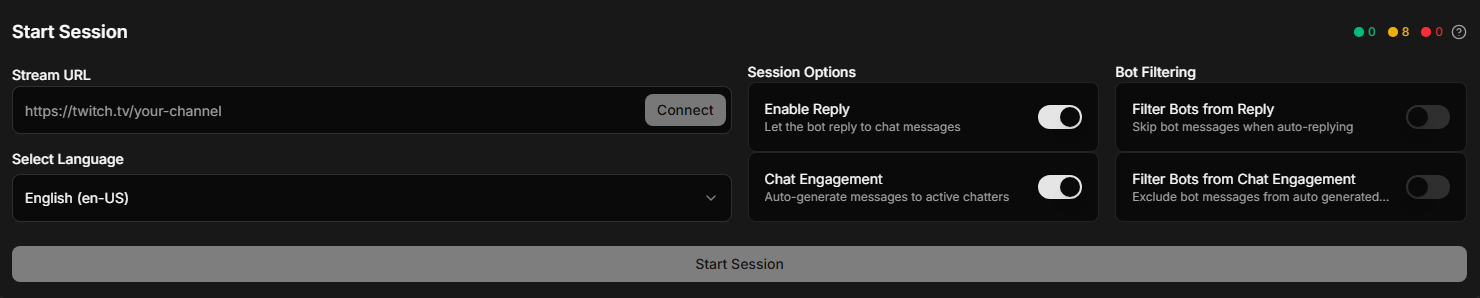
The Bot Filter: We also know that if you are running multiple bot accounts, there is a risk they might accidentally start talking to each other. To prevent your chat from turning into an endless bot-to-bot loop, we added a quick filter setting. You can set your bots to ignore one another so they only spend their time replying to your actual viewers.
2. Contextual Chat Engagement
This is the feature we think will make the biggest difference for your streams. Instead of just sending general messages into the void, the system now actually reads the room.
It scans your active chat, looks for interesting statements, and finds the best candidates to interact with. The bot will then directly tag that chatter and ask a relevant follow-up question based entirely on what they just wrote. It’s a great way to keep the momentum going during slow moments and encourage your real viewers to keep talking.
A Quick Note on Bot Follows
We also want to clarify how channel follows work with your assigned accounts. If you want your bots to look as authentic as possible, you probably want them to be actual followers of your channel.
If your specific setup requires it, we can easily have the Algochat accounts assigned to your stream drop you a follow. Just reach out to us and let us know you need this, and we’ll get it sorted out so they blend right in with your real audience.
We hope these updates make managing your stream a lot easier and your chat a lot more active. Try out the new engagement features, and let us know how they are working for you!