Kick Viewbot & Kick AI Chatbot Update | Live Views Addon by Algochat
Boost your Kick stream with Algochat’s Kick AI chatbot and account-based Kick viewbot. Turn chatters into real live viewers using the new Live Views Addon.
🚀 Major Update: Chatters Can Now Join as Live Viewers on Kick
Hello everyone!
We’re excited to announce a major new update designed to increase visibility, engagement, and growth on Kick.
🎉 Your chatters can now join your stream not only as chat participants, but also as live viewers.
Previously, accounts connected through Algochat participated only as chatters using our Kick AI chatbot and stream chatbot system. With this update, those same accounts can now actively watch your stream as viewers, helping boost your live view count in a natural, account-based way.
👀 Introducing the Live Views Addon (Account-Based Kick Viewbot)
We’ve officially launched the Live Views Addon, now available directly in your dashboard.
This addon allows your existing chatter accounts to join your stream as real connected viewers, acting as an intelligent, account-based Kick viewbot — not anonymous or artificial traffic.
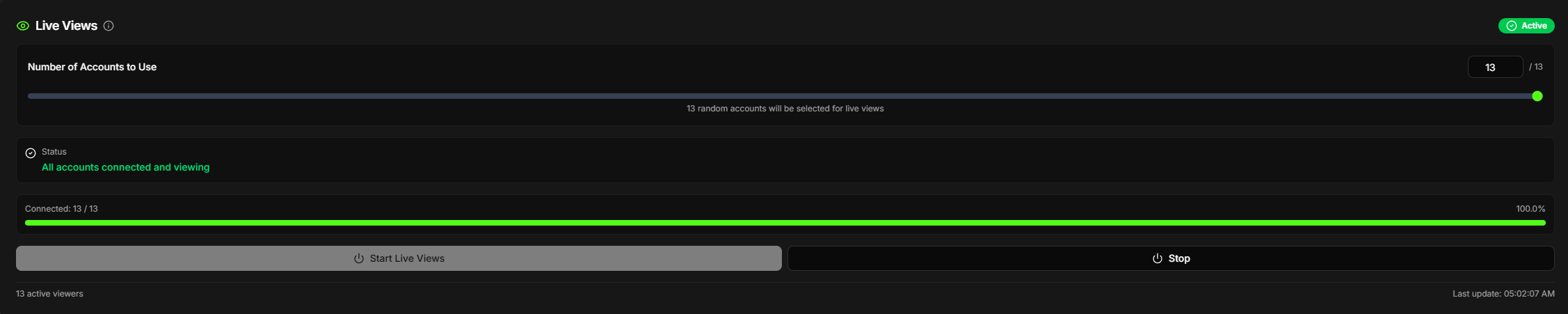 Click to view full size
🔍 What Does This Update Do?
Here’s a simple breakdown:
- You already have Kick accounts added under User Accounts
- These accounts currently interact using the Kick AI chatbot
- With the Live Views Addon enabled, the same accounts can now watch your stream as viewers
This feature was built to convert your engaged chatters into active live viewers, improving stream performance and discoverability.
⚙️ How It Works (Step-by-Step)
Getting started takes just a few clicks:
-
Add your Kick accounts under
👉 User AccountsImportant:
- Only your own added accounts can be used
- System accounts cannot be used for Live Views
-
If you don’t have accounts yet, you can:
- Follow the setup guide:
👉 Kick AI Chatbot Account Setup Guide - Or purchase ready-to-use accounts from:
👉 Addons
- Follow the setup guide:
-
Start your streaming session
-
Choose how many viewers you want to send
-
Click “Start Live Views”
✨ The system will automatically connect your accounts to your stream and begin watching as real viewers.
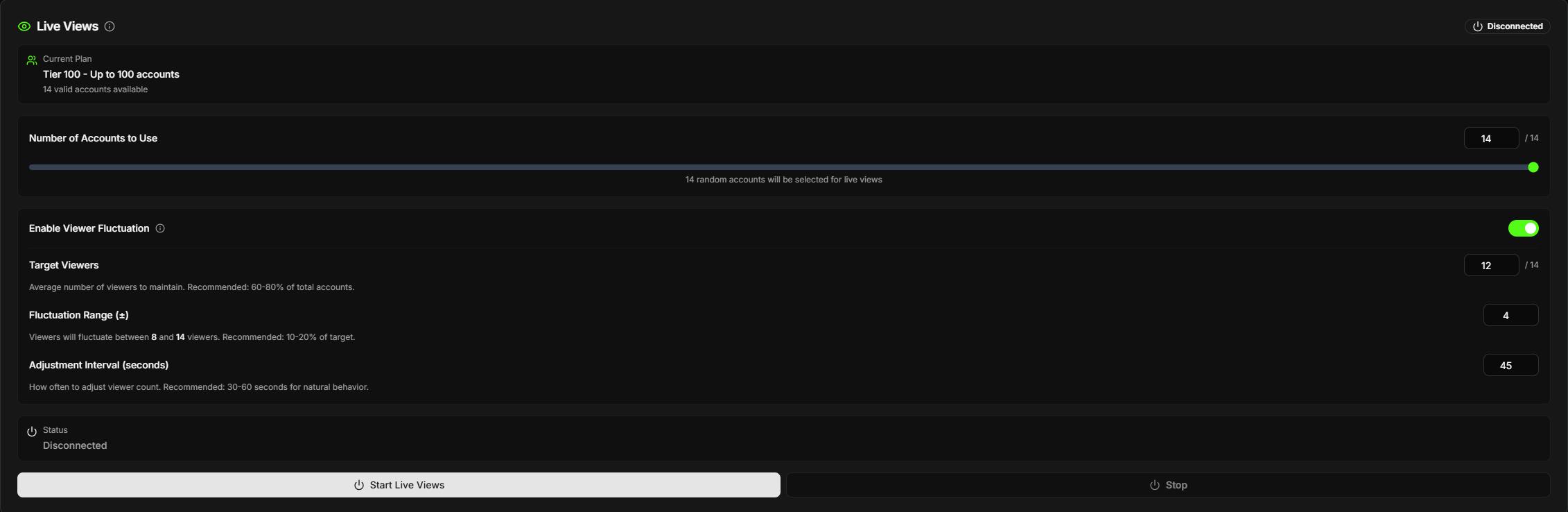 Click to view full size
🌊 Viewer Fluctuation System (Natural Live View Behavior)
To make Live Views appear more organic and human-like, Algochat includes an optional Viewer Fluctuation System.
Instead of keeping a fixed viewer count for the entire stream, this system automatically varies the number of active viewers over time, closely mimicking how real audiences behave on Kick.
🤔 Why Viewer Fluctuation Matters
Real Kick streams never have perfectly stable viewer numbers. Viewers naturally:
- Join at different times
- Leave after watching for a while
- Reconnect later
- Watch for varying durations
A completely static viewer count (for example, exactly 100 viewers for hours) can look unnatural.
The fluctuation system introduces controlled randomness to reflect real viewer behavior.
Key Benefits
- ✅ More natural viewer patterns
- ✅ Avoids flat or artificial-looking metrics
- ✅ Simulates real join/leave behavior
- ✅ Fully configurable and optional
⚙️ How the Fluctuation System Works
When enabled, the system continuously adjusts the number of connected viewer accounts within a range you define.
Step-by-Step Process
-
Initial Connection
- All selected accounts connect normally when Live Views is started.
-
Timed Adjustment Cycle
- Every X seconds (configurable), the system triggers a recalculation.
-
Random Target Selection
- A new viewer target is randomly selected within your defined range.
- Example:
- Target: 85 viewers
- Range: ±15
- Possible targets: 87, 94, 100, etc.
-
Comparison & Decision
- The system compares:
- Current active viewers
- Newly selected target
- The system compares:
-
Gradual Adjustment
- Viewer accounts are connected or disconnected gradually
- Actions are staggered with ~2-second delays
- Prevents sudden spikes or drops in view count
-
Continuous Loop
- This process repeats automatically until you stop Live Views.
📈 Example Fluctuation Flow
Configured Settings:
Target Viewers: 85
Fluctuation Range: ±15
Adjustment Interval: 45 seconds

Timeline:
00:00 → 100 accounts connect initially
00:10 → System adjusts down to 85 viewers
00:55 → System adjusts up to 95 viewers
01:40 → System adjusts to 91 viewers
02:25 → System adjusts to 100 viewers
... continues fluctuating naturally
All changes happen progressively — the system never jumps instantly between viewer counts.
🎛️ Full Control & Flexibility
You can configure:
- Target viewer count
- Minimum and maximum fluctuation range
- Adjustment interval timing
- Enable or disable fluctuation at any time
If fluctuation is disabled, Live Views will maintain a stable viewer count.
🧠 Built for Realistic Viewer Behavior
The Viewer Fluctuation System is designed to mirror real Kick viewer dynamics, not create artificial spikes.
- Uses only your owned Kick accounts
- No anonymous traffic
- No fake or empty sessions
- Works seamlessly alongside chatters
This makes Live Views feel like a natural extension of real audience engagement.
💸 Limited-Time Offer: 20% OFF
You can purchase the Live Views Addon directly from:
👉 https://www.algochat.io/dashboard/addons
To celebrate the launch, the addon is available with 20% OFF for a limited time.
🙌 What’s Next?
This update moves Algochat closer to becoming a full Kick stream growth platform, combining:
- Kick AI chatbot automation
- Stream chatbot engagement
- Account-based Kick viewbot technology
- Real viewer interaction using owned accounts
Next, we’ll be improving the User Accounts page to make adding accounts even easier with direct credential-based setup.
As always, if you have feedback, ideas, or questions, feel free to reach out.
Thank you for being part of Algochat — let’s grow your Kick streams together! 🚀